Welcome to this short “GPU Parallel Programming using CUDA (Part 1)“
WHY SHORT ?
Because keeping sections short allows us to discuss everything in smaller, focused parts. This helps the reader understand and absorb each concept more effectively, in simple language, without feeling overwhelmed. Let’s take it step by step and understand everything steadily.
Nowadays, processing datasets and overall programme has become more relevant as technology continues to advance and NVIDIA GPUs are being used everywhere. Day by day, devices are getting smarter by using basic and advanced algorithms or different types of AI. As we move forward on this path, processing information is becoming a crucial part of it.
Moving forward in our daily work, I am not sure how many of us actually utilize the GPU, but it is good to know how to use it or even how it works.
High-level Comparison -> CPU vs GPU
CPU
- Powerful ALU(s)
Each CPU core has complex arithmetic/logic units able to handle wide instruction sets and complicated control flow (branching, out-of-order execution). - Large cache per core
Multi-level caches (L1, L2, often L3 shared) are large and optimized for low-latency access for a few threads.
Another words
| NOTE What is a cache? A cache is a small, very fast type of memory that sits close to the CPU core. Its main purpose is to store copies of frequently used data so the CPU doesn’t have to fetch it from the much slower main memory (RAM) every time. Think of it like… A small notepad on your desk (cache) for quick notes, instead of opening a big file cabinet (RAM) every time you need something. |
“Large cache per core” what does it mean?
Each CPU core has its own private cache usually called L1 and L2 cache.
These caches are quite large (in comparison to GPU caches) and are built for speed and low latency meaning they can respond in just a few CPU cycles. Because CPUs usually run a few threads (not thousands like GPUs), they dedicate more cache per core to make sure each thread gets data fast.
Good for sequential and latency-sensitive tasks. CPUs are optimized for single-thread performance and tasks with lots of branching and unpredictable memory access patterns.
GPU
1. Thousands of small ALUs (cores).
A GPU doesn’t rely on a few big, complex cores like a CPU does.
Instead, it contains thousands of small, efficient Arithmetic Logic Units (ALUs) also called CUDA cores (in NVIDIA GPUs) that can all work simultaneously.
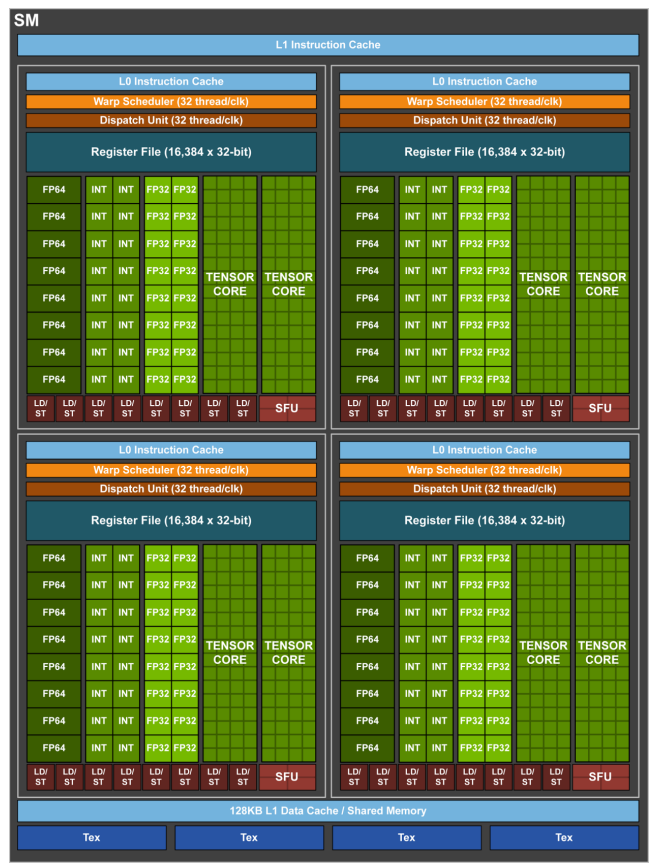
Each ALU performs simple math operations (like add, multiply, compare) very quickly. But the point is they all run the same instruction on different pieces of data this is called SIMD (Single Instruction, Multiple Data) OR in CUDA, SIMT (Single Instruction, Multiple Threads).
Example: Suppose you want to add two arrays A and B of one million elements

// CPU version (simplified)
for (int i = 0; i < 1000000; i++)
{
    C[i] = A[i] + B[i];
}
A CPU might do this with 4 to 16 threads at most (depending on cores).
A GPU, however, can launch tens of thousands of threads at once each thread adding one or more elements in parallel.
// GPU version
__global__ void addArrays(float *A, float *B, float *C)
{
    int idx = blockIdx.x * blockDim.x + threadIdx.x;
    C[idx] = A[idx] + B[idx];
}
When you launch this kernel with, say, 1000 blocks × 1024 threads = 1,024,000 threads,
each CUDA core performs one addition all simultaneously.
Result -> The entire million-element addition finishes in milliseconds.
Point to remember -> GPUs trade complex single-thread power for massive parallel throughput.2. Small caches per core, larger shared caches across groups.
Each GPU core (ALU) is lightweight and doesn’t have large private caches like a CPU core.
Instead, memory is organized in a hierarchy that balances size and speed
This table is from lower to higher end
| Level | Scope | Typical Size | Access Speed | Notes |
| Registers | Per thread | Few KB | 1 cycle | Fastest storage for thread variables |
| Shared memory / L1 cache | Per SM (shared by many threads) | 64–128 KB | ~20 cycles | User-managed cache for cooperation within a block |
| L2 cache | Shared by all SMs | Several MB | ~200 cycles | Used for global memory traffic |
| Global (Device) memory | Entire GPU | GBs | 400–800 cycles | Very high latency, but very high bandwidth |
So, while each core has very limited private memory, the SM (Streaming Multiprocessor) which groups many cores provides shared fast memory that all threads in that block can use to exchange data efficiently.
Imagine each thread reads a small piece of a matrix for multiplication.
Instead of every thread re-reading from slow global memory, all threads in a block can:
1. Load a tile of the matrix into shared memory use this (__shared__),
2. Reuse it many times while computing partial results,
3. Then store the final result.
__shared__ float tileA[32][32];
__shared__ float tileB[32][32];
This shared memory acts like a manually controlled cache and drastically reduces global memory traffic.
Result -> Shared memory = faster cooperation = higher performance.
3. What is a Warp?
A warp is a group of 32 threads that execute the same instruction at the same time on a GPU.
It is the basic unit of execution in NVIDIA GPUs.
Instead of scheduling each thread individually, the GPU scheduler handles threads in groups of 32 these are warps.
Simple analogy
Imagine a warp as a team of 32 soldiers marching in perfect sync.
They all receive the same command (instruction).
Each soldier works on a different piece of data (thread index).
They all step forward together same pace, same action.
If one soldier has to stop and take a different path (a branch), the rest of the team must wait until that soldier finishes this is called warp divergence.
So, warps work best when all 32 threads do the same kind of work. (note this point)
Example
Let’s take a simple CUDA kernel
__global__ void addArrays(float *A, float *B, float *C, int N) {
    int idx = blockIdx.x * blockDim.x + threadIdx.x;
    if (idx < N)
        C[idx] = A[idx] + B[idx];
}
If you launch this with
dim3 block(128); // 128 threads per block
dim3 grid(N / 128);
Each block has 128 threads. Those 128 threads are divided into 4 warps.
Warp 0 → threads 0–31
Warp 1 → threads 32–63
Warp 2 → threads 64–95
Warp 3 → threads 96–127
All threads in a warp execute the same instruction at a time.
for example, all perform C[idx] = A[idx] + B[idx] simultaneously on different indices.
What happens if there is a branch? wait I didn’t mentioned anything about branch
A branch is when your program has a decision point.
if (condition)
{ ... }
else
{ ... }
or
for, while, switch, break, continue, returnBasically, a branch changes the normal “straight-line” flow of instructions
some threads may go one way, others another.Normal Flow vs. Branch)
No Branch
C[idx] = A[idx] + B[idx];Every thread executes the same instruction add two numbers.
Perfectly parallel, all threads in the warp move together.
With Branch
if (A[idx] > 0)
    C[idx] = A[idx] * 2;
else
    C[idx] = A[idx] / 2;
Now we have a branch there are two possible paths.
Some threads may take the “if” path (A[idx] > 0),
others may take the “else” path (A[idx] <= 0).
How It Affects a Warp
A warp = 32 threads executing the same instruction at the same time. So if a branch occurs inside a warp, and 20 threads need to run the “if” block and 12 threads need to run the “else” block, the warp can’t do both simultaneously.
Instead, the GPU does this, Execute the if path for the 20 threads while the other 12 are paused. Then execute the else path for the 12 threads while the first 20 are paused. So effectively, both paths are run sequentially, not in parallel anymore.
That is why it is called warp divergence.
All 32 threads eventually finish their work, but half of them sit idle during each path which means lower efficiency.
Table Time
| Term | Meaning | Example | Impact |
|---|---|---|---|
| Branch | A decision point in code (if/else, for, while) | if (A[idx] > 0) | May cause divergence |
| Warp Divergence | When threads in the same warp take different branches | Some do “if”, others do “else” | GPU runs both paths serially |
| Best Case | All threads take the same path | All A[idx] > 0 or all <= 0 | No divergence, max efficiency |
Again some more to take in
| Term | Meaning |
|---|---|
| Warp | Group of 32 threads that execute together |
| SIMT (Single Instruction, Multiple Threads) | Execution model one instruction, 32 threads in parallel |
| Warp Divergence | Happens when threads in a warp take different branches |
| Best practice | Keep threads in a warp following the same execution path |
Ideal Workloads for GPUs
GPUs shine when…
The same operation runs across many data elements.
Operations are independent or easily separable.
Examples:
- Graphics: Shading millions of pixels.
- Machine Learning: Large matrix operations.
- Scientific Computing: Simulating thousands of particles.
- Image Processing: Applying filters per pixel.
Example -> Grayscale Conversion
we will look into this later discussing this in detail while learning about programming with CUDA later you can refer this example if needed for now just keep this in mind
__global__ void rgbToGray(unsigned char *rgb, unsigned char *gray, int width, int height) {
    int idx = blockIdx.x * blockDim.x + threadIdx.x;
    if (idx < width * height) {
        unsigned char r = rgb[3*idx];
        unsigned char g = rgb[3*idx + 1];
        unsigned char b = rgb[3*idx + 2];
        gray[idx] = (unsigned char)(0.3f*r + 0.59f*g + 0.11f*b);
    }
}
Each thread handles one pixel -> millions processed in parallel.
One more table to read [CPU and GPU]
| Feature | CPU | GPU |
|---|---|---|
| Core Type | Few powerful cores | Thousands of simple cores |
| Cache | Large per-core cache | Small private, large shared |
| Best For | Sequential, control-heavy tasks | Data-parallel, throughput tasks |
THANK YOU